May 2025 Release Notes
Trimble Unity Field Mobile App: Download the Trimble Unity Field mobile app to get the latest features.
e-Builder Mobile App: Update your e-Builder mobile app to get the latest features.

May 16 - Web
 What's New
Automated Weather Data
Trimble Unity Construct allows you to set up weather data fields in daily inspection report processes. Once configured, these fields can be automatically populated with location-based weather information by field personnel using the Trimble Unity Field mobile app.
This Automated Weather Data feature uses a weather data service to save time, minimize manual data entry errors, and ensure that reports contain accurate, real-time weather data for improved decision-making and effective project management.
Administrators can configure weather data fields in the process using the following steps:
- Create a mobile-enabled process type so that it is available in the Trimble Unity Field mobile app.
- Add one or more weather data fields (String or Decimal) to the process as per the syntax.
- Create a weather data fields section in the process layout. Trimble recommends placing the section in the starting step's layout for easy visibility in the mobile app.
For detailed information on how to set up and use this feature, see Add Weather Data Fields.
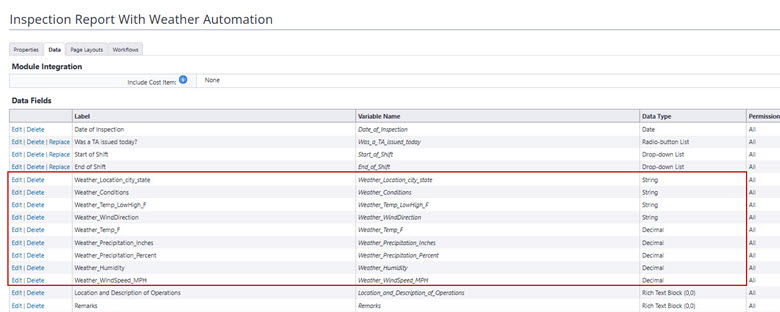
Weather Data Fields Added to a Mobile-Enabled Process
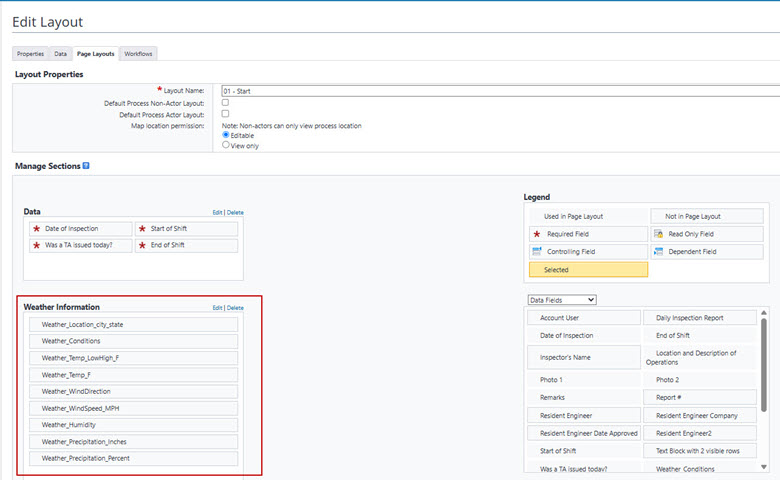
Weather Data Section Added to the Process Layout
Once the process is started in the Trimble Unity Field app, the weather data fields section is automatically populated based on the users location.
To use this feature, Trimble Unity Field app users must enable internet connectivity and location services on their mobile device.
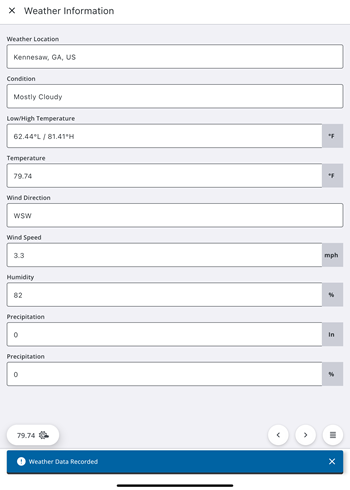
Automatically Recorded Weather Data in Trimble Unity Field
Users can override the automatically entered weather data and change the location using the weather widget in Trimble Unity Field.
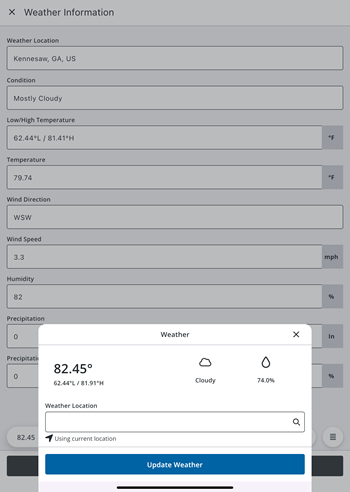
Weather Widget to Update Weather Data in Trimble Unity Field
For more information on using this feature in the Trimble Unity Field mobile app, see Add Weather Data in the Trimble Unity Field for Construct documentation.
Once the data is synced, users can view the automatically populated weather data from the Trimble Unity Field mobile app on the Process Instance page in the Trimble Unity Construct web application.
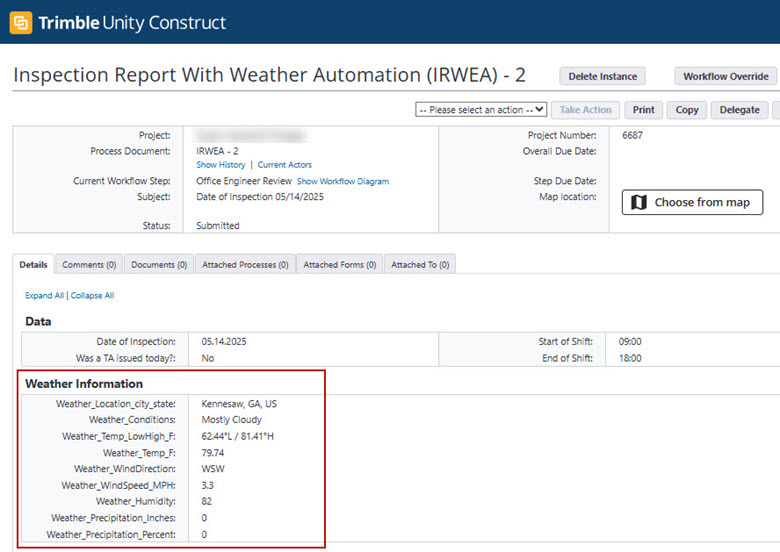
Process Instance with Automatically Filled Weather Data Fields in Trimble Unity Construct
Documents - Bluebeam Integration Updates
New APIs have been introduced for Bluebeam sessions in advance of the Bluebeam Studio Prime end-of-life phase. Bluebeam’s new centralized integration platform does not require existing customers to purchase Studio Prime subscriptions to enable integrations.
Studio Prime will reach the End of Maintenance phase on June 30, 2025 and the End of Life phase on December 31, 2025.
Bluebeam Product Requirements
As part of this update, all existing Bluebeam Studio Prime users MUST switch as soon as possible to one of the following Bluebeam products:
- Bluebeam Cloud Core subscription, or
- Bluebeam Cloud Complete subscription, or
- Bluebeam Revu for Windows desktop license (Revu 21)
For detailed pricing information, go to https://www.bluebeam.com/pricing.
Enabling the new Bluebeam Studio integration in Trimble Unity Construct
For existing Bluebeam customers, Trimble Unity Construct Administrators must confirm that all users with “Bluebeam permissions” have procured the required Bluebeam Product license.
Contact our Technical Support team at Support@e-Builder.net or call 888-288-5717 and request to have the new Bluebeam integration enabled for your account. This will typically require 1 - 2 business days.
Administrators will be notified once the new integration is enabled. On the first login after the integration is active, users will be prompted to accept the integration with Trimble Unity Construct. After this, all existing sessions will continue to function as normal.
Recycle Bin - Retention Period
Deleted files and folders that are older than 90 days will be automatically removed from the Recycle Bin. These files and folders cannot be restored after they are removed from the Recycle Bin.
The cleanup of older deleted files and folders will begin in mid-May and is expected to take 2-3 weeks to complete across the following environments: US1, US2, US3, and Canada.
Resolved Cases
The following issues have been resolved:
Calendar
- The organizer's email address for calendar event notifications has been corrected. Replies to these notifications are now delivered to the correct recipient. (Case# 601136)
Cost
- Users can no longer create new scope project commitments items linked to unapproved master commitment items. This avoids errors with any subsequent commitment change or commitment invoice on these project commitments. (Case# 603817)
Data Warehouse
- Trimble Unity Construct now supports lines, polygons and linestrings. To extract point geometries (XYZ data), users will need to perform an specific query. For more information, visit the Data Warehouse group on the Community website. (Case# 609711)
Login
- The Logout button and header are now displayed. (Case# 610931)
Processes/ Workflow
- For non-cost Master Project processes, the system behavior for handling users removed from the project has been updated. If a user is removed from the Master Project, they will also be removed from any associated process instances. (Case# 608837)
- Users will now be able to run a process log mail merge without any errors, when that mail merge template includes the process Comments table. (Case# 610427)
Projects
- Sent items can be accessed without errors. (Case# 609854)
Reports
- An issue preventing custom code from using SFTP has been resolved. (Case# 594964)
Search
- Trimble Unity Construct now allows users to search descriptions using multiple keywords. (Case# 545938)
Time Tracking
- Resolved an issue with Time Tracking where under very rare conditions, a user could be an actor on a step that they were not intended to be. (Case# 583850)